Live Music Archive
News
Live Music Archive 1.5
Nov 17, 2020
This is my first news post for Live Music Archive, but I hope to start writing one for each release to talk about the new features, some of the approaches I took, and the challenges I faced along the way.
Live Music Archive 1.5 brought with it three big new features:
- Recording Selector - The Recording Selector allows you to browse through all of the recordings from every concert. Previously when you selected a concert, the app just chose a recording for you.
- Recordings In-Depth - There is a wealth of information behind each recording including the source, lineage, taper's notes, and so much more! Now you can explore all of this info to find just the recording you're looking for.
- Recording Types - Now you can explore all of the different recording types including Soundboards, Matrix, Audience, Front of Board, and FM Radio.
Recording Selector
I have been thinking about the Recording Selector since I started building the app. I designed the concert selection interface with it in mind.
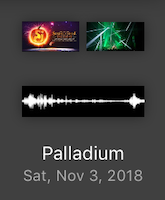
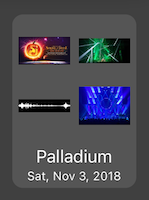
I knew this was going to be a challenging feature to implement so I didn't want to spend all of my time in version 1.0 getting this working. And boy was it challenging! Let me tell you a little bit about how I did it.
There are three major parts that make up the Recording Selector:
- Concert Cell - The Concert Cell is the main thing you interact with. It provides the user interface into all of the recordings.
- Zooming View Controller - The Zooming View Controller handles the Concert Cell's transitions from the "Concert Cell Mode" to the "Recording Selector Mode". It takes care of the view controller parent handoff, background tap dismissal, and provides the animation lifecycle that zooms in and out.
- Concert Cell Recycler - The Concert Cell Recycler provides an efficient means of reusing Concert Cells. When developing for a handheld device, resource usage is of upmost importance. To reduce memory use and improve app performance, you can reuse objects instead of creating new ones all the time. The Concert Cell Recycler plays that role for Live Music Archive. It is responsible for maintaining a pool of Concert Cells that can be used to render each Concert.
Concert Cell
Let's take a look at the Concert Cell to see how it works. There are two main modes for the Concert Cell: Concert Cell Mode and Recording Selection Mode.
Concert Cell Mode
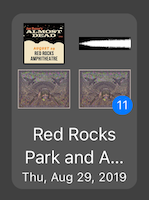
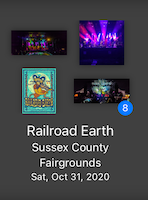
When the Concert is zoomed out, we show basic information about the concert, up to 4 images, and a badge if there are more than 4 recordings. We display a lot of Concert Cells at a time so by only displaying the bare minimum, we are able to maintain top performance.
Recording Selection Mode
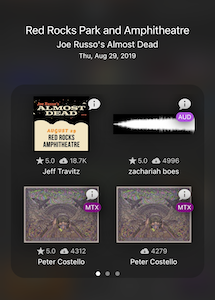
When you tap on a concert, we expand the concert full screen and show a lot more information about the concert. We add details about each recording including the number of downloads, star rating, taper information, and several icons including "More Info", "Recording Type" and "Stream-only".
You'll also notice the three little dots on the bottom. This entire view uses a UIPageController, which allows you to swipe between multiple pages of recordings.
There's a lot going on here!
Data Models
How do you define all of that complexity? With Data Models! Data models let you take your data and tailor it to a specific use case. In this case we're taking a concert and all of its recordings and picking out just the pieces of information we need to draw each cell. Here's a part of the data model for a Concert Cell:
public struct CellModel {
  public var artistName: String
  public var artistIdentifier: String
  public var concertIdentifier: String
  public var venue: String
  public var date: Date
  public var tiles: [TileModel]
}

public struct TileModel {
  public var identifier: String
  public var imageUrl: URL?
  public var taper: String?
  public var downloads: Int?
  public var rating: Double?
  public var favorite: Bool
  public var streamOnly: Bool
  public var recordingType: RecordingType?
}
Challenges
The Concert Cell is a very complex feature and we are displaying thousands of them at a time so naturally it is going to be heavy strain on system resources. The first few versions of the Concert Cell were incredibly slow, to the point that I was worried that this feature would not be feasible at all. Even on modern devices, scrolling through a collection of concerts made the UI incredibly laggy.
I spent many days profiling every bit of the Concert Cell and tracking down what was causing the lag and it really came down to two main things:
- Too many UI elements. When you are browsing through concerts, there are only a few visible elements on screen, but in the first version of the Concert Cell, I added all of the elements to the screen at once and hid them, thinking they wouldn't use up rendering resources. I was wrong. I rewrote the layout engine so the recording details don't get rendered until they are needed, then get removed once they are no longer needed.
- Drop shadows. Drop shadows have to run many calculations to render how they look so they are slow to render. The initial version of the Concert Cell had drop shadows on many of the UI elements so when you add hundreds of them, that effect is multiplied significantly.
I spent a lot of time rewriting and optimizing the UI and I'm so happy with the resulting performance! Even with the significant added complexity, it's actually faster than previous versions because of the time I spent on this.
Zooming View Controller
The ZoomingViewController handles all of the responsibilities related to the user tapping on a concert and zooming into the Recording Selector. It's used in several different locations in the app including the Artist, Discover, and Favorites Views so I made it reusable across different contexts.
One of its responsibilities is providing an animation lifecycle for the transition between zoomed in and zoomed out modes. There are 6 animation lifecycle events for each zooming in and out (there are ZoomOut versions of each of these):
- preZoomInAnimation - a quick animation before the zoom-in animation starts
- preZoomInAnimationCompleted - the pre-zoom animation is complete
- zoomInAnimation - the actual zoom animation is taking effect
- zoomInAnimationCompleted - the zoom animation is complete
- postZoomInAnimation - a quick animation after the zoom-out animation completes
- postZoomInAnimationCompleted - the post-zoom animation is complete
These lifecycle events allow the Concert Cell (or any other view that uses this) to animate parts of itself at specific points in the animation process. For instance, before zooming in, we hide the cell details, then zoom the view in, and once the zooming-in is complete, we add the concert details to the view and fade them in. Similarly, zooming out, we hide the details first, remove them from the view, perform the zoom out animation, then fade the cell details in.
Challenges
There is some trickiness in taking the Concert Cell away from its Collection View and transferring it to another context. The basics are simple enough, but since a CollectionView can potentially be updated while the Recording Selector is open, you can run into data inconsistency issues and cause app crashes.
To prevent these types of crashes, I did two things:
- Create an interruptible FetchedResultsDelegate that allows you to pause CollectionView updates and resume them later. This does require that you don't do more than one data update while it's paused, otherwise the CollectionView becomes out of sync with the datasource. Which led me to the second thing.
- Pause all data updates while the Recording Selector is open. The app updates its concert information periodically, but if an update occurs while the Recording Selector is open, it could cause a data inconsistency. By pausing the updates, any in-progress updates will finish, but no new ones will be started.
Concert Cell Recycler
When developing for mobile devices, your resources are limited so you need to be conscientious about how much memory and processing power you use. To facilitate this, iOS makes extensive use of object recycling, which means instead of creating new objects every time you need them, you reuse an existing one that is no longer being used and configure it for a new use.
In Live Music Archive, we display thousands of concerts at a time and, due to the complexity of the Concert Cell, I wanted to be able to reuse them. The Concert Cell Recycler allows us to build a pool of Concert Cells with different configurations and reuse them as-needed.
Live Music Archive uses four main variations of the Concert Cell and they just differ in the number of recordings shown per page: 1, 2, 3, and 4.
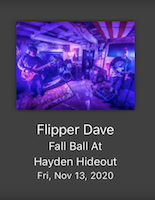
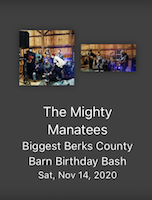
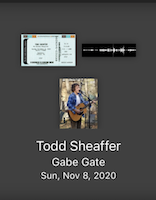
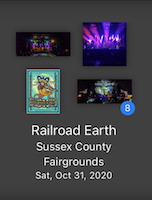
The ViewControllerRecycler lets us build up pools of the four different types of Concert Cells and reuse them so we're not constantly creating new cells and all the overhead that comes with that.
Challenges
Early versions of the Concert Cell Recycler had some timing issues where I was recycling cells too early so when they were supposed to be displayed, they weren't there. I was recycling the Concert Cell in UICollectionView didEndDisplaying and assigning a new Concert Cell in cellForItem, BUT cellForItem isn't necessarily called when the cell is displayed again. The solution was to recycle the old Concert Cell AND assign the new Concert Cell at the same time in cellForItem. This is the one time you can be sure a UICollectionViewCell is no longer going to be needed.
Conclusion
I hope this gave you a bit of an insight into what goes into building Live Music Archive. This just scratches the surface of what goes on, but it's such an amazing process! There are lots of frustrations, sometimes spending days tracking down a single bug, but it's always so satisfying to see the end result of months of work.
I hope you enjoy the app!